How to Choose an FDM 3D Printer: 12 Factors to Consider

Investing in a FFF (also known as FDM) 3D printer is an important business decision. At its core, choosing a 3D printer means the printer that fulfills the requirements of your application the most cost effectively. When looking to purchase a 3D printer, a business should be informed of the following:

  1. The business’ application’s 3D printing needs
  2. The 3D printer’s build volume
  3. The filaments needed for the business’ application
  4. Dual extruder 3D printers
  5. How a business should budget for a 3D printer
  6. The cost to operate the printer
  7. Easy to use printer

However, businesses should also become informed of a 3D printer’s quality and safety features, as these could be additional measurements of a professional 3D printer. Businesses should also be aware that 3D printing software and support from a 3D printer manufacturer can affect their 3D printing experience, learning curve, and 3D printing production.

This guide will discuss what you need to consider when determining which 3D printer is right for your business.

Step 1a: Determine Whether You Need an In-House 3D Printer or a 3D Printing Service

Some common reasons why companies need 3D printing include making manufacturing more efficient, producing customizable parts, and performing small-batch manufacturing. Read “Why Businesses Need 3d Printing” for a more comprehensive description of why businesses need 3D printing.

If your business has decided that it can benefit and implement 3D printing into its operations, it will need to decide whether to opt for an in-house 3D printer, or a 3D printing service. If your business did not need 3D printing before, it could indicate that you may not need an in-house 3D printer just yet. Your intended application or goal for 3D printing can help determine whether purchasing a 3D printer is the right option for you.

For example, if the project’s goal is to print a few parts, it may be more beneficial to outsource this task to a 3D printing service capable of producing the parts you need rather than purchasing a 3D printer.

However, if your business aims to increase production or create product models for your business then it would be better if you purchased a 3D printer. In addition, if your goal is to start a 3D printing business, then it would be necessary to purchase a 3D printer.

Step 1b: Understand Your 3D Printing Application

Understanding your 3D printing application is crucial because it will help determine which type of 3D printer and which 3D printing technology will work best for you. One way to start understanding your 3D printing application includes keeping in mind your industry and your intended use for the 3D printer.

Common industries that incorporate 3D printing into their operations include:

  1. Automotive
  2. Education
  3. Entertainment
  4. Manufacturing
  5. Medical

Common 3D printing applications include:

  1. End-use parts
  2. Jigs & Fixtures
  3. Prototyping
  4. Production
  5. Model Making

For example, KIDO Sports CO, Ltd. is a motorcycle helmet manufacturer who used 3D printing in their prototyping to edit and test new helmet designs cost-effectively before mass-producing the designs. This resulted in more accurate, customer-oriented helmets for their clients.

Read about other 3D printing applications across different industries here.

Step 2: Make Sure the 3D Printer Has the Right Build Volume for Your Application

A 3D printer’s build volume refers to the size of the parts it can produce. Different build volumes are suitable for different types of projects and applications.

A desktop 3D printer like the E2 has a single extrusion build volume of 330x240x240 mm (13×9.4×9.4 inches) and is an excellent option for projects that require smaller parts whose size will not increase over time. Desktop 3D printers are excellent options for schools and small-batch manufacturing.

The Bolton School Junior Boys use an E2 desktop 3D printer because the machine is small enough to fit on a desk, yet has a large enough build volume to produce different projects. Printing with the E2 helped students learn interdisciplinary design and production in art, design, and technology courses. Read Bolton’s 3D printing experience with the E2 here.

In comparison, a large-format 3D printer like the RMF 500 has a build volume of 500x500x500 mm (19x19x19 inches) for single and dual extruder printing.  The RMF large format 3D printer produces high-performance end-use parts with repeatability, making it an excellent option for small batch manufacturing.

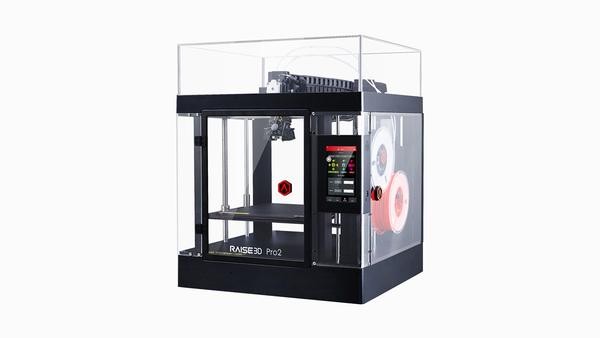
There are many instances when a business needs to print a part whose size is not practical to produce on a desktop 3D printer or a large format 3D printer. Or a business may currently have projects that are smaller, but will need to produce larger parts in the near future. Looking for a 3D printer with a more flexible build volume is helpful in these situations. For example, the dual extruder 3D printers in the Pro2 Series and the Pro3 Series.

The Pro2 Series includes:

  1. Pro2 with a build volume of 305x305x305 mm (12x12x11.8 inches)
  2. Pro2 Plus 3D printer with a build volume of 305x305x605 mm (12x12x23.8 inches)

The Pro3 Series includes:

  1. Pro3 with a build volume of 300x300x300mm
  2. Pro3 Plus with a build volume of 300x300x605mm.

A 3D printer with a build volume like the printers in the Pro2 and Pro3 Series give businesses the flexibility to print parts of different sizes.


3D Printer Table

Step 3A: Make Sure the 3D Printer Processes the Filaments You Will Need

The right 3D printer for your business will be able to support the right filament for your application.

The right 3D printing filament for your application depends on a variety of factors, including the following:

  1. The type of part that will be printed
  2. How that part will be used
  3. The conditions that part will be under (for example: whether it needs to perform well in high heat, or have high strength)
  4. The desired result for what the project is trying to achieve
  5. The quality of the part needs to be (Keep in mind that price can be an indicator of the quality of the filament)

Depending on the type of work that needs to be done, a business may need a printer that can process a variety of filaments, or may only need a printer that specializes in a few types of filaments.

For example, the E2CF is an IDEX desktop 3D printer with features that make carbon fiber 3D printing easier. At the moment the E2CF is compatible with PA12 CF, which is a carbon fiber reinforced filament. A business whose 3D printing application will remain focused on producing carbon fiber printing could benefit from a 3D printer such as the E2CF.

There are printers capable of printing with a wide range of filaments. For example the E2, Pro2 Series, and Pro3 Series can process the following: PLA, ABS, HIPS, PC, TPU, TPE, NYLON, PETG, ASA, PP, PVA, Glass Fiber Infused, Carbon Fiber Infused, Metal Fill, Wood Fill. A business can benefit from purchasing a printer capable of printing a variety of filaments  in the following types of situations:

  1. Current projects require multiple filaments
  2. Parts that require a support structure during printing
  3. There is uncertainty whether future projects will require different types of filaments

Finally, ISO certifications are available for filaments. For example, biodegradable materials that offer sterilization capabilities are distinguished by the FDA. A 3D printer manufacturer that possesses ISO certifications (ISO9001, ISO14001) can indicate the quality of your filaments and printers.

Step 3B: Make Sure the 3D Printer Processes the Filaments You Will Need

When researching a printer’s filament capability confirm whether the 3D printer can support third-party filaments, because it usually affects the material’s cost and availability of various materials. A 3D printer manufacturer with an Open Filament Program (OFP) makes it easy to choose from a wide variety of filaments with the best quality and top performance for your printing needs.

An Open Filament Program is a collaboration between the manufacturer and several selected certified filament manufacturers to identify and pick top-performing filaments that are highly compatible with the 3D printer manufacturer’s printers. This ensures that materials are certified by the manufacturer.

Since filaments listed in an OFP are compatible with the 3D printer, they can be easily installed into the printer’s settings. This is much easier than buying a filament from another brand and setting it up yourself. It is a time-consuming process and the quality of the results will depend on the user’s experience.

Step 4: Learn About Dual Extruder 3D Printers

When searching for a 3D printer, you will notice that 3D printers feature either a single or dual extruder to perform single or dual extrusion printing. Some businesses may find that a 3D printer with a single extruder can perform the 3D printing project to the standards required of their application. However, most businesses may find that a dual extruder 3D printer better suits their needs. These printers perform advanced functions and processes making them an important asset in a variety of applications such as prototyping, production, manufacturing, and RnD.

Dual extruder 3D printers can also perform dual-color printing and dual material printing. Dual material printing allows you to produce parts with breakaway support in a material different than that of the part. Breakaway supports give you the freedom to create more intricate and complex designs and geometries.

Sometimes only one material is necessary to produce a part and if it is necessary to print the part with breakaway support, it is possible to print the part and breakaway support in the same filament. However, if the part and support are printed in the same material, the support may be difficult to remove or it can cause damage to the final print.

For example, if a part and its break-away support are printed in carbon fiber, the break-away support will be hard to remove.

Carbon fiber if you use its own material to support it, it will be hard to remove. Break away support saves you time and effort. It also gives you the freedom and geometry to make more things.

Step 5: Budget

There is a price range for different level printers. Pricing on a 3D printer can range from as low as  $200 to a million. Printers under $1,000 can generally satisfy the needs and requirements of hobbyists. Professional 3D printers well suited for business applications usually start at $3,000. While a business’ 3D printing needs can be met with a $3,000 professional printer, having a budget of at least $5,000 gives a business more options and flexibility when purchasing a printer.

Several factors contribute to the cost of a 3D printer, such as:

  1. The type of 3D printer
  2. The 3D printer’s build volume
  3. The quality of the 3D printer

Many options of FDM 3D printers are priced within a $5,000 budget. For example, a dual extruder 3D printer, like the Pro2 is $3,999. A desktop 3D printer with IDEX, like the E2, is $3,499.  And a desktop IDEX 3D printer for carbon fiber printing, like the E2CF, is $4,499.

When shopping for a 3D printer it is important to understand that a printer’s price is not the only cost associated with purchasing a 3D printer. 3D printers have direct and hidden costs.

Direct Costs:

  1. 3D Printer Price
  2. Materials
  3. Equipment
  4. Labor Costs

Hidden Costs:

  1. Consumables
  2. Slicing Software
  3. Training & Electrical Resources
  4. Electricity costs
  5. Machine operator

Hidden Cost Table


Because of direct and hidden costs, it is advisable to maintain two budgets when shopping for a 3D printer. The first budget is for the actual 3D printer. The second budget is the yearly budget for the function and maintenance of the printer. A common mistake businesses make when purchasing their first 3D printer is to spend the whole budget on the actual printer, leaving no room for maintenance or consumable costs. Consumables include replacing the filament used in 3D printing and the cost of replacing machine parts due to wear and tear during the 3D printing process. Examples of machine parts that receive a lot of wear and tear including nozzles, hotends and, Buildtak or other printing surfaces.

Depending how often a business is printing consumables can cost $1,500 a year, and this needs to be considered when budgeting for a machine.

For general purposes, a 5K-10K budget is enough for purchasing a high quality 3D printer. However, when the task is too demanding, i.e. big parts, metal parts, etc, a larger budget is necessary to accommodate the demand.

At times businesses may have different 3D printing options that fit their application needs. For example, a business may require a metal part and may initially look into SLM for direct metal 3D printing. SLM is an high cost system that uses a high powered laser that melts and fuses an expensive metal powder to build a metal part. However, indirect metal 3D printing is also capable of producing a metal part that fits the business’ needs, and a business can choose indirect metal 3D printing over CNC and SLM. For example, Metalfuse from Raise3D is a metal 3D printing system that can operate at 10% or 20% of the cost of SLM because it does not use a high powered laser or metal powder as a material. This option may not work for every business because the final 3D printed part from an indirect metal 3D printer will have less density than that of an SLM printer. Less density results in a loss of mechanical strength, but not all applications require such high mechanical strength. For example, SLM printed parts can have a density of 99% and above, and the Metalfuse achieves 97% density. 97% density can meet the requirements of most applications. Another factor to consider is the maximum size that can be built with indirect metal 3D printing. Generally, because of the debinding and sintering process, the part can not be too large. Make sure an indirect metal 3D printing option like Metalfuse can produce metal parts in the size required by the business application. Contact Raise3D to discuss if Metalfuse indirect metal 3D printer can suit your needs.


When choosing a 3D printer for an application, selecting the most cost-effective option gives the business flexibility to invest in more 3D printers. In general, investing in creating an in-house printing farm of several different 3D printers is advantageous to a business. The types of 3D printers included in the farm can range across the most cost-effective and the most capable. Therefore, a single printer does not need to be used for all the applications a business requires. It is possible to have several types of printers for different applications. In addition, a 3D printer may not be able to fulfill all the requirements of an application. If a business needs to invest in additional manufacturing equipment beyond a 3D printer, then choosing the most cost-effective printer will leave flexibility in the budget for other manufacturing equipment.

Printing metal parts can be used as an example to help explain this point further. If a business requires metal parts for an application, then SLM or an indirect metal 3D printing process OR CNC, like Raise3D’s Metalfuse, is necessary to produce those parts. If the business chooses Metalfuse is a much lower cost system than SLM, but a relatively higher cost by the dollar amount. However, it may not be necessary to produce the part in metal before deciding and achieving the final design of the metal parts. A business can use another 3D printer, like the Pro3 Series, to prototype the part in plastic to finalize the design before producing the part in metal. By prototyping the prototype using a more cost-effective printer for the task, like the Pro3 Series, the more cost-effective printer will lower the business’ overall expense and get to the final part quicker. Therefore, a single printer does not need to be used for all applications, and a single printer is not necessary for the same application, because different printers may be more cost-effective for different stages of production.


3D printing is not an instant process. Depending on the type of project, it can take over 10 hours to finish a print job. Some materials, such as resin, require post-processing, adding to a project’s timeline. Purchasing multiple 3D printers gives engineers on the team more access to a printer, meaning no one has to wait for a machine to be ready to use. This maximizes workflow and increases production, resulting in an advantage over competitors.

Investing in multiple printers saves time, and shortens a business’ production cycle. Shortening production cycles gives a business the ability to react to clients and new situations quicker. Having a slow response to urgent matters and clients can result in a loss of revenue and a loss of confidence in a company. For example, a business might be prototyping with a client who constantly updates its needs. Since the client’s needs change frequently, a business could lose the client’s confidence if it can not accommodate the new changes efficiently.


When the COVID-19 pandemic began, the supply chain for most businesses was impacted. It prompted many businesses to look for ways to have more control over their operations. Owning a 3D printer allows businesses to produce what they need in-house, removing the dependency and time spent waiting on a third party and shipping. During this time, businesses that owned a 3D printer had more control over their operations. However, businesses that invested in multiple 3D printers saved more time and were able to serve customers better because they eliminated the time spent waiting for a project to finish printing before beginning a new print job.


For example, a business with a $10,000 budget can purchase one Pro3 Plus professional 3D printer, priced at $7,249 with a build volume of 10 × 11.8 × 23.8 inch/ 255 × 300 × 605 mm. If a business does not need a printer with a larger build volume, like the Pro3 Plus, then it should leave room in the budget for operational costs, filament, and consumables like hotends.

A business can purchase:

  1. Pro3 priced at $5,249
    With a Pro3, a business can have a printer with features to improve the overall 3D printing experience.
  2. E2 priced at $3,499
    If the business is producing batches of smaller parts, then it could consider purchasing several E2IDEX 3D printers to boost productivity.
  3. E2CF, priced at $4,499.
    A business also has the option to purchase the E2CF for high strength parts in a carbon fiber enhanced composite filament.

Important Factors to Keep in Mind When Purchasing a 3D Printer

The above 5 steps guide businesses interested in purchasing 3D printers on how to break down their research for searching and budgeting for the right 3D printer. However, there are other equally important factors that businesses should give equal importance to when evaluating 3D printers.

1. Choose a High Quality 3D Printer

When purchasing a 3D printer, businesses should pay close attention to the printer’s quality. The price of a 3D printer is not the most reliable measure of a printer’s quality.

Visit the manufacturer’s website or read the buyer reviews to learn if the printer has received any industrial awards and recognition. Manufacturers of high-quality printers share the certifications, awards, and recognition their products receive on their websites.

For example, Raise3D shares on its website that the Raise3D factory is ISO certified. This means that all their products are made in factories that possess the IOS9001 and ISO14001 certifications. To put it simply, it means these printers are made with good components.

ISO9001 certification is defined as the international standard that specifies requirements for a quality management system (QMS). Organizations use the standard to demonstrate the ability to consistently provide products and services that meet customer and regulatory requirements. Companies that possess this certification are recognized for creating, implementing, and maintaining a Quality Management System.

An ISO14001 certification states that an organization is required to identify and have access to all applicable legal requirements related to its environmental aspects. ISO 14001 is an internationally agreed standard that sets out the requirements for an environmental management system. It helps organizations improve their environmental performance through more efficient use of resources and reduction of waste, gaining a competitive advantage, and the trust of stakeholders.

2A. Choose a High Quality Slicing Software

While a high-quality 3D printer is capable of producing a quality print, it executes the model based on a series of commands given to it in the printing file. The printing file makes a difference in the quality and success rate of a print. For example, if someone printed the same model using identical machines but different templates, the final printing results can have different results: a good quality print, a lower quality print, or even a failed print. Therefore, a high quality printing file is necessary for the printer to execute the model you need. Businesses that use a high quality slicing software with advanced features, and an optimized algorithm will be more likely to produce a high quality printing file.

Load the 3D model to the slicing software to begin preparing the printing file. A common choice for the code format used in the printing file is GCode. Code format, like Gcode, is the series of commands that dictates to the printer how to execute the model based on the settings in the slicing template.

Note: When exporting the 3D model, remember to make sure the chosen file format is compatible with the slicing software, and 3D printer. STL and OBJ are the two most common file types that modeling software can export and slicing software and 3D printers can import.

Examples of the settings that can be controlled in the slicing template include:
1. print speed
2. nozzle temperature
3. bed temperature
4. infill percentage
5. infill pattern
6. retraction settings
7. print order prioritization

Creating high quality instructions in the printing file during this step is critical to a print’s success rate. This is because 3D printing produces an object layer by layer, depending on the layer thickness set in the template, the file is cut into an x-amount of layers, and the number of layers equals the model height divided by the layer thickness, which is where slicing comes from. However, different printing methods finish each layer differently. FDM/FFF printing the hotend is controlled to move from one spot to another spot, drawing lines of a certain width and thickness. The thickness of these lines is the Layer Height. The width of these lines is the Nozzle Height. This line will finish the layer, and then the next layer is built on top of the existing layer. How well the slicer is able to prepare the file for printing each layer, and how well each layer is sliced is the foundation of a print having a good success rate. A good, high quality slicing software with good starting templates and open to a variety of setting adjustments to fine tune printing templates for the best results is essential for producing a high quality printing file.

ideaMaker is a free, easy-to-use slicing software developed by Raise3D. This slicer can import STL, OBJ, 3MF, and OTLP files and export GCode. In addition to processing these files, ideaMaker can process pre-existing templates, and templates uploaded to ideaMaker Library (open software template where users can contribute and download designs from different users) from other users.

An example of one of ideaMaker features is Automatic Support.

1. Automatic Support
This user-friendly slicer can automatically generate support structures and features an auto-repair tool that can highlight and correct any areas of the model that need repair. Users can edit the automatically generated supports by adding or removing supports from the part. ideaMaker also offers features to fine-tune the model before printing such as the ability to cut, duplicate, and change the file size.

ideaMaker’s advanced features allow users to customize and optimize settings for their model. Examples of its advanced features include:

  1. Modifiers
    ideaMaker’s modifiers allow users to specify settings changes within specific regions of the model. This means users do not need to use the same settings for the whole structure, and can only customize the sections that require it. For example, if a part needs to be strong within a certain area without such advanced modifiers, users may need to print the entire part solid and use additional material. However, ideaMaker’s modifiers give users the ability to specify the exact area that needs to be strong, rather than being forced to make the entire part solid and use extra material.
  2. Adding Texture
    Users can skip lengthy CAD processing and easily create different iterations of the same STL model by applying different patterns to the selected model’s surface. It works by creating a concave or convex surface on the designated model according to the values of an image’s greyscale. Users can try out an unlimited amount of images for many appearance options. This easy-to-use feature gives those still learning modeling skills the possibility of customizing the surface of a 3D printable object with a texture.

ideaMaker is compatible with filaments such as PLA, ABS, ASA, PETG, TPU, PP, and PC. There are pre-set templates for the E2CF to process PA12CF and its support material for carbon fiber printing. The E2 desktop 3D printer can also run GCode from this template. In addition to processing a wide range of filaments, ideaMaker is compatible with Raise3D’s Open Filament Program (OFP). OFP is a collaboration between Raise3D and several filament manufacturers to identify which filaments work best on Raise3D printers.

ideaMaker’s range of features makes it a useful slicing software to users of different levels of 3D printing experience. This high quality slicing software also connects to the rest of Raise3D’s suite of 3D printing software, ideaMaker Library, and RaiseCloud, resulting in a sophisticated 3D printing software ecosystem.


2B. Choose a 3D Printing Management Platform

RaiseCloud is a cloud-based 3D printing management platform developed by Raise3D. With RaiseCloud users can remotely operate and monitor the printer from their mobile device accessing files, webcam streams, the status of their print job, and more.

The ability to operate remotely is a valuable asset for businesses. For example, since RaiseCloud features a webcam stream of the print job, having a person on-site to monitor the print job is no longer necessary, lowering the cost of labor.

Operating remotely also gives businesses the ability to react quickly to unexpected changes. For example, COVID-19 made working remotely necessary, and businesses had to suddenly alter how they operated. Businesses that had RaiseCloud were able to continue their 3D printing operations and continue production. In comparison, businesses without a printer management software like RaiseCloud needed to spend time figuring out and setting up remote operations, causing production delays.

RaiseCloud also manages users and printing tasks while keeping teams synchronized, improving workflow management which is useful for businesses that require multiple 3D printers. For example, a business with multiple printers needs to manage the sequence of print jobs to make sure when a printing task finishes, the next task can begin without losing time. With RaiseCloud, businesses can create a queue of printing tasks, and assign these tasks to printers, making sure that time is not lost on any project.

RaiseCloud pairs with ideaMaker, completing Raise3D’s 3D printing ecosystem. The Raise3D ecosystem results in a better 3D printing experience while producing high quality prints.

3. Choose a 3D Printer with Fail Safe Features

When 3D printing, there can be certain occurrences that can cause a print to fail or to be damaged. Two common examples are if the filament runs out during printing, or if there is a power outage during printing.

  1. Filament Runs Out

If the filament runs out during printing, the part can break or snap in the middle, and can not be repaired. The print job will need to be restarted. However, professional, high quality printers will include features to alert users before the filament runs out during printing. For example, Raise3D printers feature filament run-out sensors on their extruders that can sense and alert when the filament is about to run out.

  1. Power Outage

A power outage or an accidental unplugging of the printer will cause the printing process to stop. In this situation, after power is restored, the printer will not be able to continue printing from where it left off unless it has some features that address power outages. For example, Raise3D printers feature power loss recovery, meaning the printer can pause and save its place during a power outage and resume printing when power is restored.

  1. Automatic Detection

Since some businesses want to be mindful that the 3D printers are fully enclosed, the business may want the option to pause printing if the printer’s door or lid is opened. Printers like the Pro3 Series, E2CF, and E2 provide businesses the option to enable a feature called Automatic Detection. If a business enables Automatic Detection, printing will pause if the printer’s door or lid is opened. If the business does not enable Automatic Detection, then the printer will continue printing even when the printer’s door or lid is opened.

4. Choose a 3D Printer That Offers Support From the Manufacturer

A 3D printer with support from the manufacturer or reseller (whose sales network offers good support), is easier to communicate with, and offers educational resources to learn how to use the printer is invaluable. Receiving support results in a smoother, better 3D printing experience and it shortens the learning curve enabling businesses to start printing quicker.

For example, Raise3D offers a Support Center with a Ticket System to answer your technical questions. We also provide an online demo studio where you can connect with us, and schedule presale or sale demo sessions. Our online educational resources include manuals, guides, and a learning center, RaiseAcademy. We share educational videos and live streams on Raise3D’s Youtube channel.

Why Businesses Need 3D Printing

Businesses seek to increase profits, lower costs, or speed up production. However, it is not always clear what can improve business operations. 3D printing is an effective technology that can both lower costs while speeding up production. Depending on its intended purpose, it can create customizable pieces or lower excess material waste.

Before Implementing 3D Printing

Each industry and business has its method of operating. But typically, a business’ operations can be broken down into sections. It starts with market research, moves towards some form of research and development, which may or may not include prototyping, then manufacturing, the result of which is either it is put to market or incorporated into the business. The timing of this process varies across businesses and industries, but it can easily take years. The R&D and prototyping portion of operations can last from months to a few years.

This process is generally labor-intensive and expensive, especially with R&D and prototyping. For starters, R&D and prototyping generally require low quantities, making it impossible to balance out the overhead cost over a large quantity. Prototyping alone requires several rounds of modification and improvement. This means that the total amount spent for each prototyping model builds up quickly. With each round of prototyping also comes the time spent waiting for each part to be produced. 3D printing allows businesses to produce parts quickly with less expense which leads to a faster and more efficient prototyping period. A faster prototyping period leads to a faster market release compared to a business’ competitors with less investment in time, production cost, and staff labor.

How 3D Printing Improves Production

3D printing makes the production timeline and effort more efficient, especially during the R&D and prototyping production phase. 3D printing prototypes shortens the research and development phase because a prototype can be printed in several hours compared to requiring several days with traditional methods. Industrial 3D printers also allow businesses to create prototypes with little to zero manual labor, lowering their production costs. By lowering the required manual labor, a business also lowers the need for tool production. Tool production can increase the production timeline and cost. By lowering the need for tool production, a business eliminates the costs, lead times, and labor associated with tool production.

Sportmaster is a retailer of apparel, footwear, and equipment. To stay competitive Sportmaster relies on 3D printing prototypes for fast testing and minor adjustments. Before using 3D printed prototypes Sportsmaster would create designs of new products and a third party would manufacture these designs into prototypes. If the third party made an error, or the prototype testing revealed the need for a minor adjustment, Sportsmaster waited weeks for the updated design. After using a Raise3D printer to create the 3D printed prototypes, Sportsmaster saw a 40% reduction in production time for new products and a 30% reduction in production costs.

3D Printed Parts are Customizable

3D printed products and components are highly customizable. This customization capability gives the business the flexibility to design the exact parts and components that are needed, avoiding complex assembly requirements. This, in turn, lowers labor and costs associated with the assembly process. Faster design and prototype production means a business can reach it to market before competitors.

Livemaster had the unique challenge of mass-producing custom dolls and doll accessories for collectors. Before using an industrial 3D printer from Raise 3D, Livemaster relied on using gypsum but disliked the quality. After creating 3D printed dolls and accessories Livemaster produced stronger and more detailed pieces at a higher quality. To learn about Livemaster’s 3D printing process, click here.

3D Printed Manufacturing Parts and Components

At times suppliers and vendors go out of business or retire a manufacturing part that is essential to business operations.  If something of this nature occurs, replacing the necessary part by traditional manufacturing methods is impossible. In other situations, perhaps it is still possible to locate the manufacturing component, but the cost is too high. The solution to both situations is 3D printing. Since an industrial 3D printer can produce customizable parts efficiently and cost-effectively, it can produce any type of necessary manufacturing piece.

DRAKES is a manufacturing and development business that produces 3D printed car parts for the automobile community. Before using 3D printing, DRAKES would create parts using the traditional method which relies on heavy labor and materials like resin and fiberglass. This method led to many inaccuracies. After DRAKES replaced the traditional manufacturing method with 3D printing, the cost of labor reduced and many parts were produced a day. To learn more about DRAKES success with 3D printing in the automobile industry, click here.

3D Printing is Less Wasteful

Traditional manufacturing requires the builder to create a part or component from a block of material. 3D printing technology prints thin layers of material to build the object directly. By printing an object directly, a business avoids material waste. Lower waste of materials leads to a lower cost. By printing the object directly, the production team also have design freedom to print complex designs.

Industrial 3D Printers Lead to Local Manufacturing

The size and required capabilities of a 3D printed part dictate the type of 3D printer that a business requires. However, even large 3D printers for special capabilities are available locally. As a local manufacturing model, 3D printing produces the necessary products on demand whenever they are needed. Most businesses that require 3D printing, ultimately choose to keep a 3D printer in-house.

How to Recognize 3D Printing Opportunities

There are plenty of ways of incorporating 3D printing into business operations. The most common opportunities for 3D printing are in research and development, prototyping, customizing, and manufacturing. For example, R&D and prototyping overlap for certain businesses, other times they do not. Regardless, any form of testing a new product or piece for function or design can be done with 3D printing.

What Changed to make 3D Printing More Accessible?

The world saw a surge in popularity of 3D printing in 2009 with the early 3D printers from Makerbot. 3D printing has come a long way since then, and in its progress, it has become more accessible. One of the biggest changes since 2009 is the development of a variety of higher-quality printing materials. These materials are generally different forms of plastics such as PLA, ABS, and TPU. 3D printing plastics are also known as filaments. However, it is possible to find filaments of wood and metal. This array of printing materials widened the opportunity to use 3D printers. This allowed more businesses to use 3D printers for more projects. With more businesses adopting 3D printing techniques into their operations, the cost of 3D printers and filaments lowered significantly since 2009.

Over time the 3D printing industry has become more accessible and easier to implement in businesses across many industries. 3D printing offers many benefits such as lowering cost and increasing production. It replaces traditional processes and methods which require too much time or cost for a business. Choosing a 3D printer involves a few steps. First, know the kinds of projects the printer will be involved with. Next, set an appropriate budget to purchase a quality 3D printer to produce high-quality 3D printed parts. Finally, research and understand which kinds of filaments the project will require. Click here for a thorough explanation of how to choose a 3D printer.

Connect with Raise3D:

Have you had a great experience with Raise3D that you would like to share? Please contact us at inquiry@raise3d.com. We look forward to hearing from you.

For more information about Raise3D printers and services, browse our website, or schedule a demo with one of our 3D printing experts.

Subscribe

Subscribe to the Raise3D Academy newsletter for up to date information on 3D printing, 3D printers and Raise3D.


Getting Started with 3D Printers

The following is a collection of resources for those who are starting to become familiar with 3D printing and 3D printers. These resources perform a variety of functions beginning with answering “What is 3D Printing” to serving as a guide for choosing a 3D printer, to understanding maintenance for the industrial 3D printers from Raise3D.

Request a demo of Raise3D’s 3D printers

For those requiring any assistance, submit a Ticket at the Raise3D Ticket System

Getting Started with RaiseCloud

Raise3D Academy’s Getting Started with RaiseCloud aims to make setting up RaiseCloud simple. RaiseCloud is a cloud-based 3D printing management software that remotely monitors the entire printing production. An essential part of making sure RaiseCloud operates well is in making sure to use the most recent firmware.

For more information about 3D printers and 3D printing, visit and subscribe to the official Raise3D Youtube channel

Quick Starter Guide

The goal of Raise3D Academy’s Quick Starter Guide is to help new 3D printer owners to become familiar with the printers. Included in this section are manuals for an overview of the Pro2 Series and E2 from Raise3D. It also has access to step by step articles and videos demonstrating how to unbox and set up these industrial 3D printers.

Getting Started with ideaMaker

ideaMaker is a 3D slicer software from Raise3D with a user-friendly interface for limitless customization. Use our resources to learn everything from getting started to pairing ideaMaker with RaiseCloud to importing and exporting files on ideaMaker. Download this 3D printer slicer software for free today!

ideaMaker Slicer Software Videos

For more information about 3D printers and 3D printing, visit and subscribe to the official Raise3D Youtube channel

Quick Links

A collection of resources from Raise3D Academy aimed at those who want to find all the educational material about 3D printing in one spot.


Click here to learn more about the different types of 3D printers available from Raise3D

Click here to learn more about ideaMaker

Click here to learn more about RaiseCloud

Sales & Support

Raise3D offers extensive sales and support to ensure that every 3D printer owner can easily operate and maintain their machines. From a direct sales team based in the U.S. to resellers across the globe, Raise3D prioritizes assisting our clients. Read on for more detailed information regarding specific situations.

Raise3D headquarters located in Irvine, California has a direct sales team for any orders made in the United States.

Contact Us with any questions or concerns or request a demo of our 3D printers.

For those located outside the United States, Raise3D has resellers to many countries.
For any questions regarding purchases, locate a reseller in your region.

For additional support after making a purchase, please visit the Raise3D Support Center.

Raise3D Academy does offer technical support and information in different sections such as Technical Questions and Getting Started pages.

For questions about a printer, submit a ticket through the Raise3D Ticket System. Please note that the printer serial number will be required to submit a ticket.

The printer serial number can be found in the touchscreen or under the barcode at the back of the printer